Appearance
The mini timer
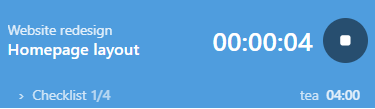
The mini timer is a small frameless window that stays on top of everything. It shows the running task and the elapsed time.
Using it
- Play / stop starts or stops the timer. Starting again continues with the last task.
- Double-click the time to open the full Loop window.
- Hover to show the tools: a new-task button, the checklist and the full window.
- Drag it anywhere. Drag the thin grip on its right edge to change its width.
- Right-click for a menu: New task, Checklist, Open full window, See-through drawer (experimental), Always on top, Start a countdown, Pause reminders and Hide mini timer.
Quick timers in the mini
A running quick timer shows on the right of the bottom line, for example tea 04:00. If you have several, the rest show as +2. Click it to pause or resume. When it is finished it pulses softly, and a click dismisses it.
Checklist
The mini can hold a checklist for the current task. It appears under the timer as › Checklist 2/5. The last row is a dashed +. Click it to add an item. Press Enter to add and keep typing, Esc to close.
Settings
Under Settings > Timer > Mini timer you can close the mini when you stop the normal timer, turn on the see-through drawer and set its opacity, switch to the mini when a focus session starts, and close it when focus ends.